ZOE International works to end child trafficking through prevention, rescue, and restoration. For our Tennessee Tech capstone, five of us built two bilingual tools for ZOE's team in Thailand: a case management system they share with police partners, and a dashboard that runs ZOE's social media accounts. I built the account management side. We worked in Agile cycles, tracked our tasks on a Trello board, and let ZOE's feedback guide each feature.
Traffickers recruit and groom victims on social media. One dashboard controls many accounts, so ZOE can keep an active presence, gather open-source leads, and pass them to police.
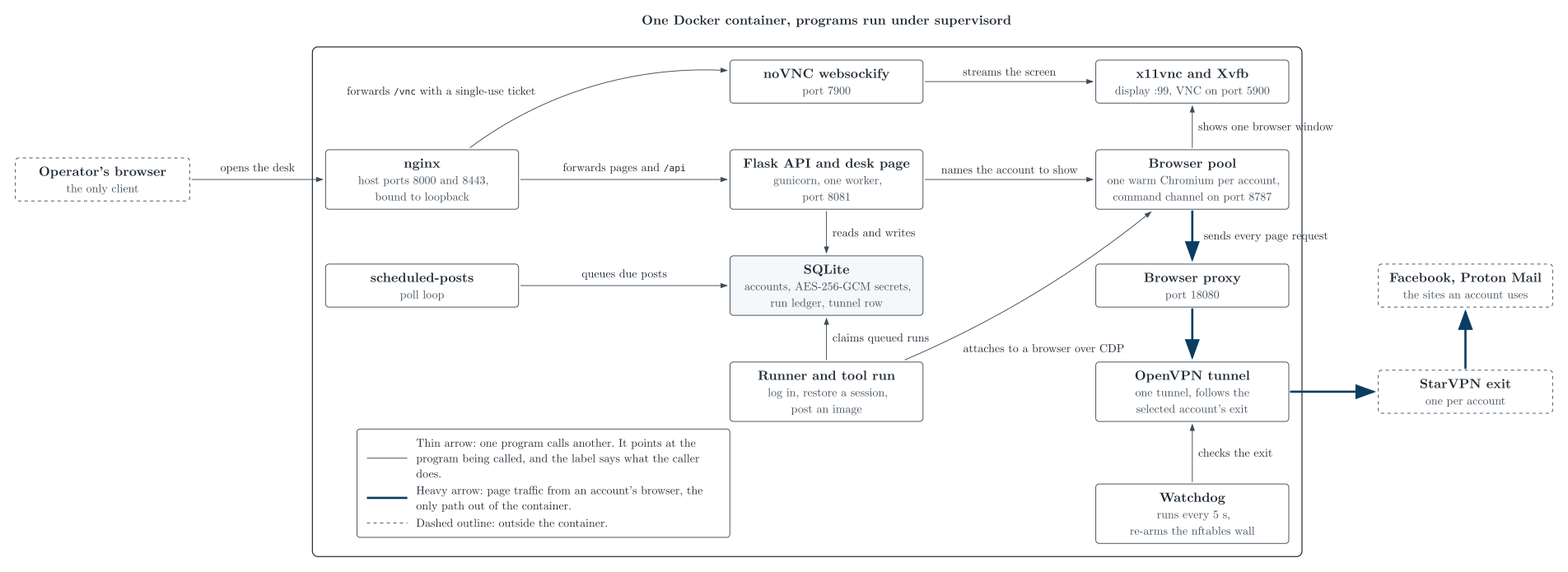
Each account has its own Chromium browser, its own VPN region through OpenVPN, its own storage, and its own audit log of what happened and when. Playwright handles logins and fetches two-factor codes, and posts on a schedule with AI-assisted captions. An operator can watch and control any account's browser live over noVNC. Account and browser data are encrypted at rest with AES-256-GCM.
It all runs in one Docker container: nginx in front, a Flask website and REST API, and a pool of browsers. The container uses swap to switch between account browsers, so many accounts fit on an AWS instance with 2 CPU cores and 4 GB of RAM. We used Google Cloud on school credits for CI/CD and testing before deploying to AWS.